L.A.T. Apparel Product Hub Portal
PIM & Canto DAM Self-Service User Guide & FAQ
The L.A.T. Apparel Product Hub Portal combines access to both product information and marketing imagery/assets, giving users a single destination to independently find, download, and utilize the resources they need. The goal of this platform is to provide a self-service experience, reducing the need for requests to Marketing, Merchandising, or Product Management teams.
Watch the Training Video
What is the L.A.T. Apparel Product Hub Portal?
The L.A.T. Apparel Product Hub Portal is the central access point for both Product Information Management (PIM) data and Canto Digital Asset Management (DAM) imagery.
Where do I access the PIM?
The PIM is available through the L.A.T. Apparel Product Hub Portal.
https://latapparel.canto.com/v/Distributor
You can also access the portal directly from the bottom of our homepage by clicking “Image Library.” This will take you to the portal where you can access approved imagery and product information.
Where do I access Canto DAM?
Canto is accessible directly through the L.A.T. Apparel Product Hub Portal.
Will I receive separate links or bookmarks?
No. Users should access both systems through the L.A.T. Apparel Product Hub Portal.
Do I need separate logins for the PIM and Canto?
No. The portal has been designed to provide a seamless experience between systems.
Who do I contact if I cannot access the portal?
Finding Products
How do I search for a product?
You can search using:
- Style Number
- Color
- Year
- Image Type
- Keywords/Tags
What information can I search by?
Common search criteria include:
- Style number
- Product name
- Color
- Launch year
- Keywords and tags
How do I know I'm seeing the most current information?
All product data displayed within the system has been verified by L.A.T. Apparel.
How often is product information updated?
Product information is refreshed quarterly.
Accessing Images
Where should I go to find product images?
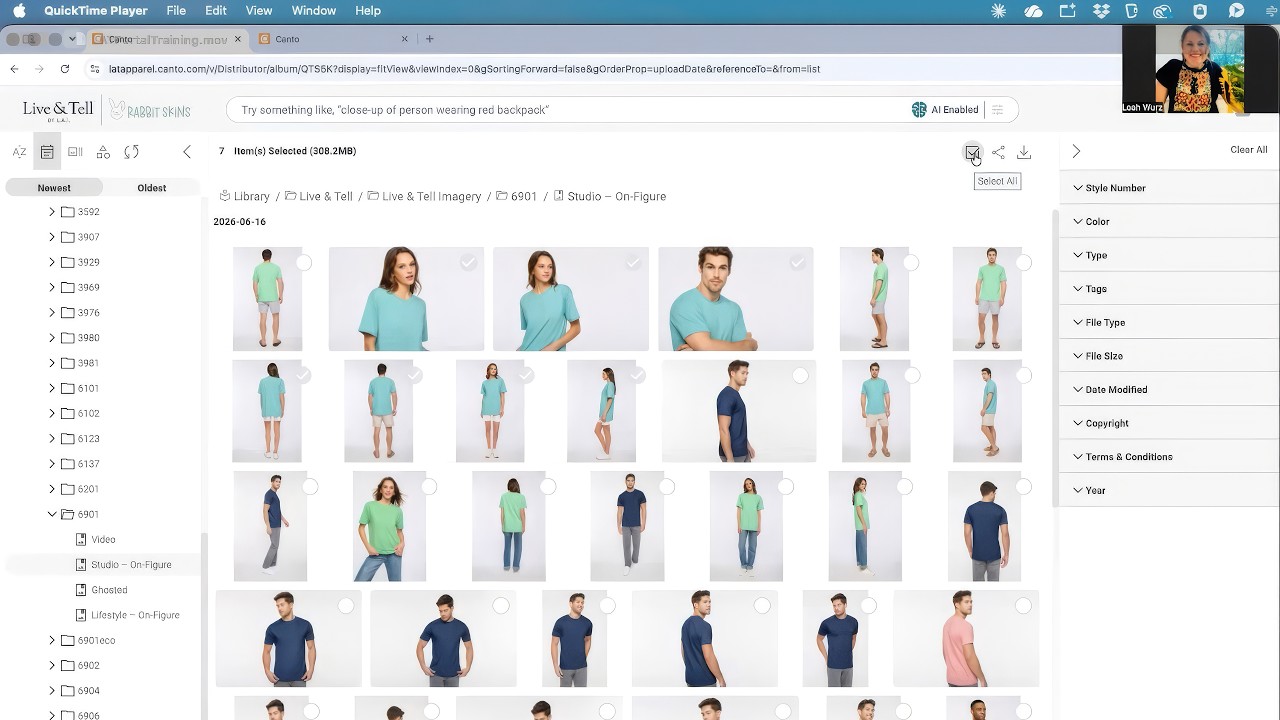
For the best search and download experience, all imagery should be accessed through Canto DAM.
Should I search in the PIM or Canto for images?
For imagery, Canto DAM.
What image types are available?
Studio Images
Best used for:
- Website product pages
- Catalog placement
Studio images serve as our primary “hero” photography.
Ghosted Images
Best used for:
- Color swatches and rollovers
- Front, back, and side product views
- Virtual proofs
- Product comparison tools
Lifestyle Images
Best used for:
- Marketing campaigns
- Website feature areas
- Email campaigns
- Social media content
- Digital advertising
Video Assets
Best used for:
- Product storytelling
- Marketing campaigns
- Social media content
- Web experiences
Can I download images in different sizes or formats?
Available download options will be displayed within Canto based on the asset type and permissions.
Product Information & Data
Where can I find product specifications and details?
Product specifications, features, dimensions, and other product data are available within the PIM.
Can I export product information?
Yes. Product information can be exported directly from the system.
What file formats are available?
Available export formats will be displayed within the PIM during export. CSV and XLS.
Using the PIM and DAM Together
If I need both product information and images, where should I start?
Start in the L.A.T. Apparel Product Hub Portal.
Is there one location where I can access both systems?
The Product Hub Portal serves as the central access point for both product data and imagery.
How do the PIM and DAM work together?
The PIM houses verified product information while Canto houses approved marketing assets and imagery. Together, they provide a complete product resource solution.
What is the recommended workflow?
- Search and identify the product.
- Review product information in the PIM.
- Access associated imagery through Canto.
- Download the assets needed for your project.
- Deploy content according to your business needs and usage requirements.
Self-Service Expectations
What does “self-service” mean?
Self-service means users are empowered to locate, access, download, and use product information and imagery independently without requiring assistance from Marketing, Merchandising, Product Management, or other L.A.T. Apparel teams based on the terms and conditions set forth.
What tasks am I expected to complete on my own?
Users are expected to independently:
- Search for products
- Locate images
- Download assets
- Export product data
- Access training materials
- Reference FAQs and support documentation
What requests no longer require support from L.A.T. teams?
Routine requests for:
- Product images
- Product specifications
- Product downloads
- Product exports
- Basic asset retrieval
should be completed directly through the portal.
What resources are available to help me?
Available resources include:
- Training videos
- FAQ documentation
- Terms & Conditions
- Canto Help Center
- Internal training meetings
Is training documentation available?
Yes. Users will have access to:
- Recorded training sessions from Canto
- FAQs
- User guides
- Support documentation
How do I troubleshoot common issues?
Before submitting a support request:
- Review the FAQ.
- Watch the training video.
- Check the Canto Help Center.
- Confirm you have accepted the Terms & Conditions.
- Verify you are searching using supported criteria.
When should I submit a support request?
Submit a support request when:
- You cannot access the system.
- Product information appears incorrect.
- Images are missing.
- Downloads fail.
- Technical issues prevent self-service use.
Downloads & Deliverables
How do I download all assets for a product?
Use the download options available within Canto to select and download all associated assets.
Can I download product data and images together?
Product data and imagery are maintained in separate systems but can be accessed through the Product Hub Portal.
Are there download limitations?
Download limitations, if applicable, will be determined by system permissions and available functionality.
Data Accuracy & Governance
Who owns and maintains product data?
Merchandising and PIM Administration Teams
Who owns and maintains product imagery?
Marketing Team
How do I report missing images or incorrect information?
How do I request updates or corrections?
What are my responsibilities after downloading content?
Once assets or product data have been downloaded, the user assumes responsibility for:
- Proper asset usage based on the terms and conditions
- Version control
- Managing expiration dates
- Distribution to third parties
- Deployment to external vendors
- Ensuring content remains current and compliant
Users should always verify they are working from the most recent approved materials before publication.
Support & Escalation
Who should I contact for support?
When should I escalate an issue?
Escalate issues when:
- Critical assets are unavailable
- Product data appears inaccurate
- System access is unavailable
- Downloads are not functioning properly
Key Takeaway
The L.A.T. Apparel Product Hub Portal, PIM, and Canto DAM have been designed as a self-service resource. Users should be able to independently:
- Find product information
- Locate approved imagery
- Download assets
- Export product data
- Access training materials
- Resolve common questions using available resources
The goal is to provide users with the information they need, when they need it, without relying on manual requests to internal L.A.T. Apparel teams.